A mechanism must exist to bypass blocks of content
2.4.1
Required
High
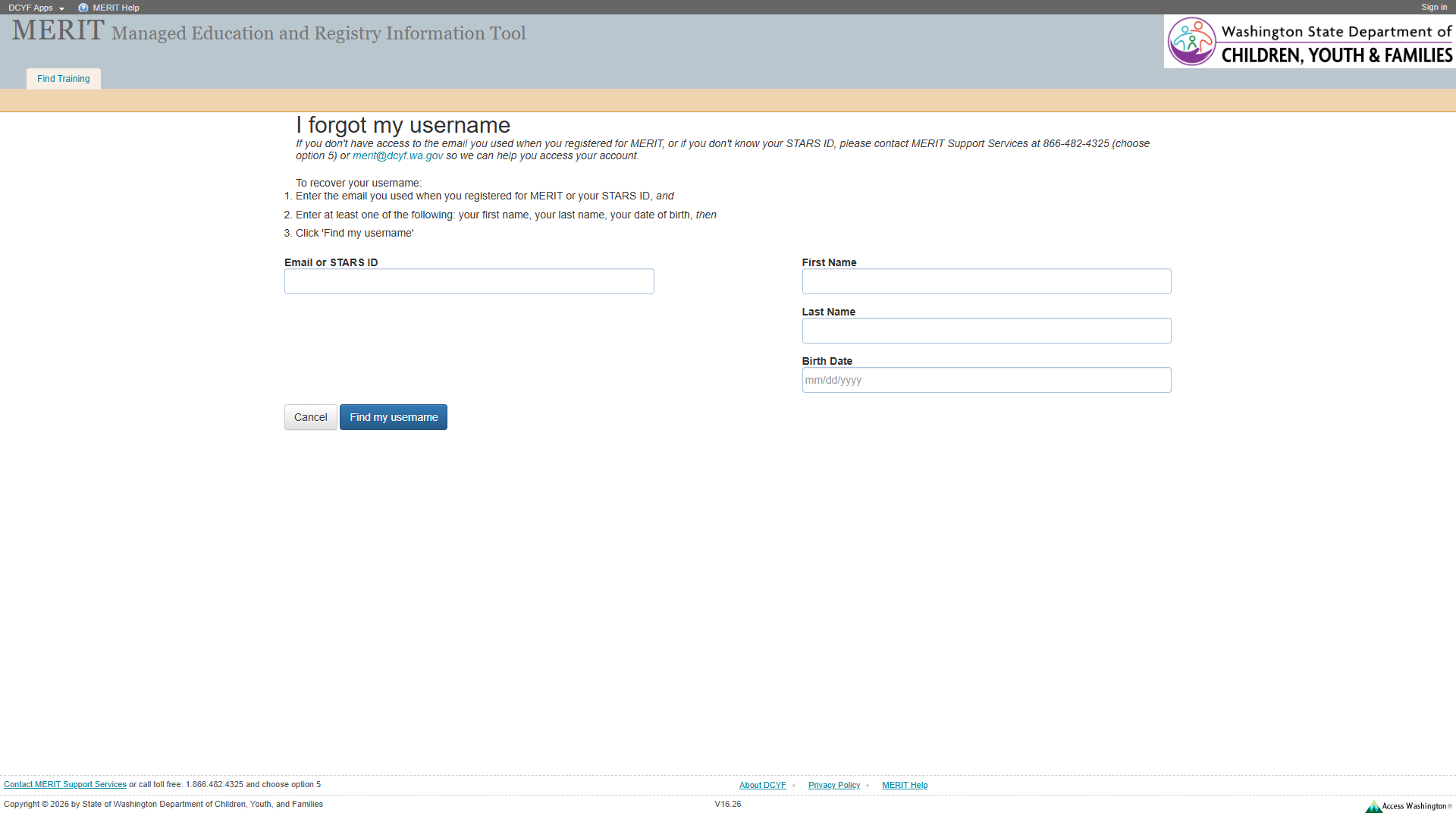
No skip link present. The first focusable element is the “DCYF Apps” link in the header bar. Keyboard users must tab through all header elements to reach the form. While <main> is present (providing landmark navigation), a skip link is still recommended as a complementary bypass mechanism.
Add a visually-hidden, focus-visible skip link as the first focusable element: <a href="#main-content">Skip to main content</a>.
2
Missing Navigation Landmark
Navigation lists should be designated with <nav>
–
Best practice
Medium
Header link list (ref=e6: DCYF Apps, MERIT Help) and footer link list (ref=e62: About DCYF, Privacy Policy, MERIT Help) are not wrapped in <nav>. The “Find Training” list (ref=e17) is also not in a <nav>. No <nav> element exists on the page.
Wrap navigation lists in <nav> elements with descriptive aria-label attributes.
3
H1 in Banner, Not Main Content
Main content should start with <h1>
–
Best practice
Medium
The only <h1> (“MERIT Managed Education and Registry Information Tool”, ref=e15) is in the banner. Main content starts with <h2> “I forgot my username” (ref=e27). Screen reader users navigating by heading expect <h1> to mark the beginning of main content.
Move or add a page-specific <h1> inside <main>, or change the banner heading to a different element and promote the <h2> to <h1>.
4
Page Title Could Be More Descriptive
Page title should match the top heading
–
Best practice
Low
The page title is “Recover Username” which is reasonable but does not match the visible <h2> “I forgot my username”. Including “MERIT” in the title would improve context: “Recover Username - MERIT”.
Change <title> to “I Forgot My Username - MERIT” or “Recover Username - MERIT”.
Section 2: Links and Navigation
Standards reference: links-and-navigation.md
Evaluated
Pass
Fail
N/A
35
18
8
9
Findings
#
Topic
Requirement
WCAG
Level
Severity
Description
Proposed Fix
1
Skip Navigation
A “skip” link should be the first focusable element
2.4.1
Required
High
No skip link exists on the page. While <main> landmark exists, a skip link provides an additional bypass method for keyboard-only users who may not use landmark navigation.
Add skip link as first focusable element.
2
MERIT Help Link Non-Functional
Purpose of each link must be understandable
2.4.4
Required
High
“MERIT Help” link in header (ref=e10, href="#") and footer (ref=e70, href="#") goes nowhere. Two instances of the same broken link on one page.
Provide a valid URL to a help resource, or remove the link.
3
DCYF Apps Link Non-Functional
Purpose of each link must be understandable
2.4.4
Required
High
“DCYF Apps” link (ref=e8, href="#") goes nowhere. The link text implies it should navigate to a DCYF apps directory.
Provide a valid URL or remove the link.
4
Consistent Help
Help mechanisms on multiple pages must occur in same relative order
3.2.6
Required
Medium
“MERIT Help” (href="#") is non-functional. If this is meant to be a help mechanism, it fails the consistency requirement because it does not actually provide help on any page.
Make “MERIT Help” link functional across all pages.
5
Multiple Ways
Multiple ways must be available to find other web pages
2.4.5
Required
Medium
Navigation is limited to header links (Sign in, Find Training) and footer links. No site search, site map, or breadcrumbs.
Add at least two navigation methods.
6
Navigation List Markup
Navigation lists should use <nav>
–
Best practice
Medium
No <nav> elements on the page.
Wrap navigation lists in <nav>.
7
Links vs. Buttons
Links should navigate; should not be used for scripted functionality
–
Best practice
Medium
“DCYF Apps” and “MERIT Help” links with href="#" do not navigate.
Convert to buttons or provide real URLs.
8
Mailto URI Scheme
Link to email uses mailto:// which is non-standard
–
Best practice
Low
The inline “merit@dcyf.wa.gov” link (ref=e32) uses mailto://merit@dcyf.wa.gov (with double slash) instead of the standard mailto:merit@dcyf.wa.gov. Some email clients may not handle the non-standard URI. The footer version (ref=e60) correctly uses mailto:merit@dcyf.wa.gov.
Change mailto:// to mailto: in the inline link.
Section 3: Images and Visual Design
Standards reference: images-and-visual-design.md
Evaluated
Pass
Fail
N/A
43
30
3
10
Findings
#
Topic
Requirement
WCAG
Level
Severity
Description
Proposed Fix
1
Small Footer Text
Fonts should be easily readable
–
Best practice
Low
Footer text appears at approximately 11px, consistent with the site-wide issue.
Increase footer text to at least 14px.
2
Form Label Visual Weight
Labels should be visually adjacent to their controls
–
Best practice
Low
The “Email or STARS ID” field label uses regular weight text. The field is described as “This field is required” (ref=e42) but the required status is communicated only through the container’s accessible name, not visually. Other fields (First Name, Last Name, Birth Date) have consistent label styling.
Add a visual required indicator (e.g., asterisk) to the “Email or STARS ID” label.
3
UI Component Contrast
Contrast of UI control boundaries must be at least 3:1
1.4.11
Required
Medium
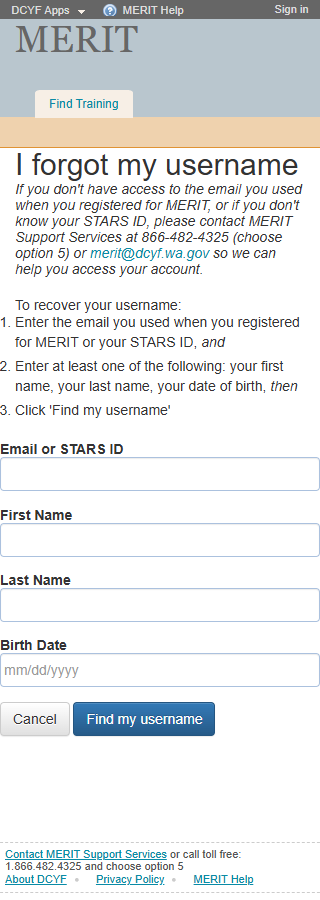
Form input fields have light borders against a white background. The contrast may be insufficient. The 320px screenshot shows the inputs more clearly – borders appear light gray. Manual measurement needed.
Ensure input borders achieve at least 3:1 contrast ratio against the white background.
Contrast Measurements
Element
Foreground
Background
Ratio
Required
Result
H2 “I forgot my username” (large)
Dark text
White
~12:1+
3:1
PASS
Body text
Dark (#212529)
White
~15:1
4.5:1
PASS
“Find my username” button
White text
Blue bg
~4.5:1
4.5:1
PASS (borderline)
“Cancel” button
Dark text
White/light bg
~12:1+
4.5:1
PASS
Footer links
Blue (#0D6EFD)
White
~4.5:1
4.5:1
PASS (borderline)
Section 4: User Input, Forms, and Dynamic Content
Standards reference: user-input-forms.md
Evaluated
Pass
Fail
N/A
117
41
8
68
Findings
#
Topic
Requirement
WCAG
Level
Severity
Description
Proposed Fix
1
Labels Not Programmatically Associated
Labels must be programmatically associated with inputs
1.3.1
Required
High
The form fields use text nodes adjacent to <input> elements but do not use <label> elements with for attributes. In the snapshot: “Email or STARS ID” is text inside a container (ref=e42) with a textbox (ref=e43); “First Name” is text before textbox (ref=e47); “Last Name” text before textbox (ref=e49); “Birth Date” text before textbox (ref=e51). None appear to use <label for="...">. Screen readers may not announce field names when tabbing through the form.
Wrap each label in <label for="field-id"> or use aria-labelledby to create explicit associations.
2
“Email or STARS ID” Field Required But Not Marked
Required fields should be designated programmatically and visually
–
Best practice
Medium
The container ref=e42 has an accessible name “This field is required” but the textbox itself does not have required or aria-required="true". There is no visual asterisk or “required” text visible to sighted users in the label area.
Add required attribute to the input. Add a visual indicator (asterisk with legend explaining required fields).
3
Date Format Instruction
Restrictions should be communicated in the label or instructions
–
Best practice
Medium
The Birth Date field has placeholder text “mm/dd/yyyy” (ref=e51) indicating the expected format. However, placeholder text disappears on input and is not available to all assistive technologies.
Add a persistent visible hint (e.g., “mm/dd/yyyy” as helper text below the field) or use aria-describedby to link to format instructions.
4
Input Purpose Not Identified
Input purpose for personal data must be programmatically defined
1.3.5
Required
Medium
None of the input fields have autocomplete attributes. These collect personal data (email, first name, last name, birth date) and should identify purpose.
Add appropriate autocomplete values: autocomplete="email" for Email, autocomplete="given-name" for First Name, autocomplete="family-name" for Last Name, autocomplete="bday" for Birth Date.
5
No Visible Error Handling
Error messages must identify the item in error
3.3.1
Required
Medium
The snapshot shows no error state. It is unclear how the form communicates errors when required fields are empty or invalid data is entered. Manual testing needed.
Ensure error messages use aria-describedby or aria-invalid="true" to associate errors with fields.
6
No Group Label for Form
Group labels should be programmatically associated with the group
1.3.1
Required
Medium
The form fields are not grouped in a <fieldset> with a <legend>. The heading “I forgot my username” serves as a visual group label but is not programmatically associated with the form group.
Wrap the form in <fieldset> with <legend>I forgot my username</legend>, or use aria-labelledby to associate the heading with the form.
7
Session Timeout Unknown
Users must be allowed sufficient time
2.2.1
Required
Low
It is unknown whether this page has a session timeout. If the user is navigating with assistive technology, a timeout could cause data loss.
Verify no timeout exists, or implement a timeout warning with option to extend.
8
Click Target Size
Minimum target size of 24x24 CSS pixels
2.5.8
Required
Low
Buttons appear adequately sized in both screenshots. The 320px view shows “Cancel” and “Find my username” buttons with sufficient height. Inputs are full-width. No issues observed but manual measurement recommended.
Verify all interactive elements meet 24x24px minimum.
Section 5: Multimedia, Animations, and Motion
Standards reference: multimedia-and-motion.md
Evaluated
Pass
Fail
N/A
48
2
0
46
No issues identified in this section.
No audio, video, multimedia, or animated content detected. No flashing content (WCAG 2.3.1 pass). No time-limited content visible (WCAG 2.2.1 pass – manual verification recommended for session timeout).
Summary
Compliance Overview
Section
Evaluated
Pass
Fail
N/A
1. Structure & Semantics
33
21
4
8
2. Links & Navigation
35
18
8
9
3. Images & Visual Design
43
30
3
10
4. User Input, Forms & Dynamic Content
117
41
8
68
5. Multimedia, Animations & Motion
48
2
0
46
Total
276
112
23
141
Findings by Severity
Critical
None
High
Missing skip link – no bypass mechanism for keyboard-only users (WCAG 2.4.1)
“MERIT Help” and “DCYF Apps” links with href="#" have no discernible purpose (WCAG 2.4.4)
Form labels not programmatically associated with inputs (WCAG 1.3.1)
Medium
Missing <nav> landmarks (Best practice)
<h1> in banner, not main content (Best practice)
Non-functional help mechanism (WCAG 3.2.6)
Multiple navigation methods limited (WCAG 2.4.5)
Required field not programmatically or visually indicated (Best practice)
Date format communicated only via placeholder (Best practice)
Input purpose not identified with autocomplete (WCAG 1.3.5)
No visible error handling mechanism (WCAG 3.3.1)
Form group not labeled with <fieldset>/<legend> (WCAG 1.3.1)
Page title could be more descriptive and match heading (Best practice)
Footer text at 11px (Best practice)
Non-standard mailto:// URI (Best practice)
Session timeout unknown (WCAG 2.2.1)
Visual required indicator missing (Best practice)
Notes
This page uses the modern MVC layout template with <main> landmark and <banner>/<contentinfo> landmarks, which is significantly better than the legacy .aspx pages.
The <h2> “I forgot my username” is inside <main>, providing good heading-based navigation.
The page has a <main> element (ref=e26), banner (ref=e3), and contentinfo (ref=e56) – proper landmark structure.
The form has an emphasis block with contact information for users who cannot recover their username through the form – this is good inclusive design.
The “This field is required” text in the container’s accessible name for “Email or STARS ID” provides some programmatic indication of required status, but the implementation is non-standard.
Focus indicators could not be visually confirmed from the automated screenshot; manual verification recommended.
Severity Definitions
Severity
Criteria
Critical
Required standard violated; completely blocks access for one or more disability groups (e.g., keyboard trap, no form labels, missing alt text on functional images)
High
Required standard violated; significant barrier that makes the feature very difficult to use (e.g., poor contrast on primary content, missing heading structure, focus indicator absent)
Medium
Required standard violated with moderate impact, OR Best practice violated with significant user impact (e.g., heading levels skipped, link purpose unclear from context, insufficient target size)
Low
Best practice not followed; minor impact on usability (e.g., title could be more concise, landmark count could be reduced, hover indicator could be enhanced)