Accessibility Audit: Forgot Password
| Page URL | https://apps.dcyf.wa.gov/MERIT/Public/ForgotPassword.aspx |
| Page Name | Forgot Password |
| Date | 2026-03-28 |
| Auditor | Claude Code (automated) |
| Standards Reference | docs/standards/ (WCAG 2.2 AA) |
Evidence
| Screenshot (1920x1080) | Screenshot (320px reflow) |
|---|---|
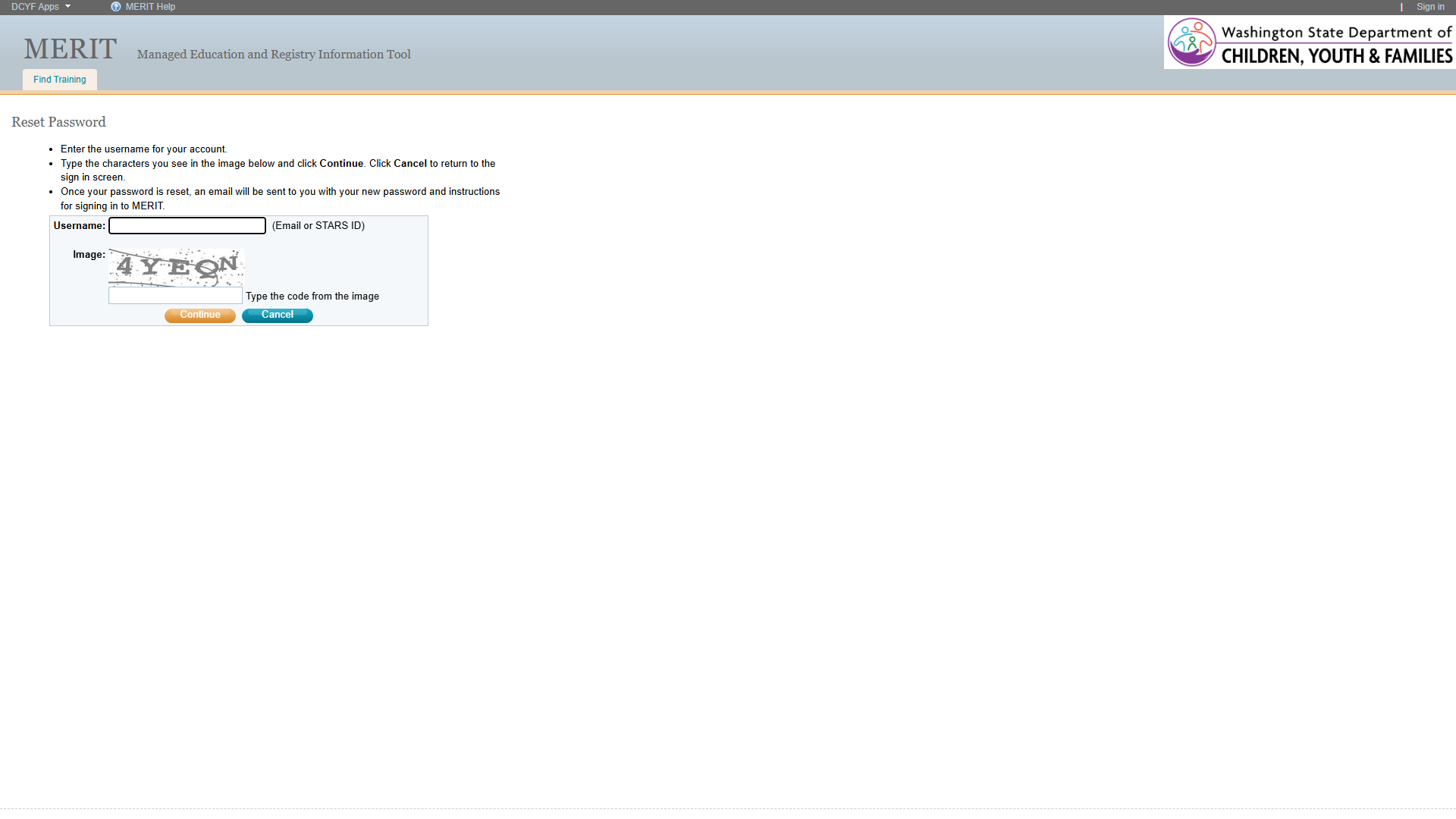 | 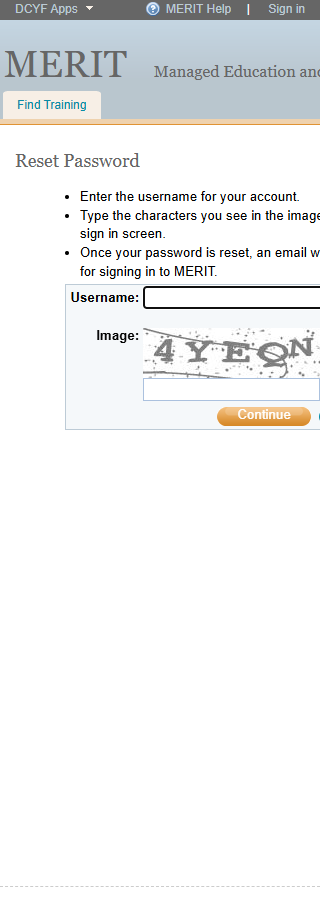 |
Section 1: Structure and Semantics
Standards reference: structure-and-semantics.md
| Evaluated | Pass | Fail | N/A |
|---|---|---|---|
| 33 | 14 | 9 | 10 |
Findings
| # | Topic | Requirement | WCAG | Level | Severity | Description | Proposed Fix |
|---|---|---|---|---|---|---|---|
| 1 | Page Title Not Descriptive | Page title must be accurate and informative | 2.4.2 | Required | Critical | The page title is “DCYF Managed Education and Registry Information Tool (MERIT)” – a generic site-wide title. It does not identify this as the Forgot Password / Reset Password page. Screen reader users cannot determine the page’s purpose from the title. | Change <title> to “Reset Password - MERIT” or “Forgot Password - MERIT”. |
| 2 | Page Title Does Not Match H1 | Page title should match or be very similar to the top heading | – | Best practice | Medium | The <title> says “DCYF Managed Education and Registry Information Tool (MERIT)” while the visible heading for the content area is “Reset Password”. These are completely unrelated. | Set <title> to “Reset Password - MERIT” to match the content heading. |
| 3 | Missing Main Landmark | Landmarks must designate predefined layout parts; all content should be within landmarks | 2.4.1 | Required | High | No <main> landmark exists. The content area (“Reset Password” heading and form) is in a generic <div> (ref=e44). This is a legacy .aspx page that uses a completely different layout structure from the modern MVC pages. | Wrap the content area in a <main> element or add role="main". |
| 4 | Missing Skip Link (Functional) | A mechanism must exist to bypass blocks of content | 2.4.1 | Required | High | The page has a “Skip Navigation Links” link (ref=e50) but it targets #ctl00_SiteMapPath2_SkipLink, which is an ASP.NET breadcrumb anchor. It does not skip to the main content area. Additionally, the skip link uses an <img> with alt text “Skip Navigation Links” instead of text. It is not the first focusable element on the page. | Replace with a proper skip link as the first focusable element, targeting the main content area. Use visible text, not an image. |
| 5 | Missing Navigation Landmark | Navigation lists should be designated with <nav> | – | Best practice | Medium | The header link list (DCYF Apps, MERIT Help) and footer link list (About DCYF, MERIT Help) are plain <ul> elements with no <nav> wrapper. | Wrap navigation lists in <nav> elements with descriptive aria-label attributes. |
| 6 | Layout Table Used for Page Structure | Tables should not be used for purely visual layout | – | Best practice | High | The entire page header (logo, title, navigation) is built with nested <table> elements (ref=e17, ref=e27). The form itself is also in a layout <table> (ref=e54). Layout tables create a confusing experience for screen reader users who expect data tables. | Replace layout tables with semantic HTML (<header>, <div>, CSS grid/flexbox). |
| 7 | Empty H3 Heading | Headings must be accurate and informative | 1.3.1, 2.4.6 | Required | Medium | An <h3> element in the header area (ref=e33 area) has no text content. Empty headings confuse screen reader heading navigation. | Remove the empty heading or populate it with meaningful text. |
| 8 | Heading Levels Skipped | Headings should not skip hierarchical levels | – | Best practice | Low | The page has <h1> (MERIT branding) then skips to <h3> (empty). The “Reset Password” text is not marked up as a heading at all – it is a plain <div> (ref=e46). | Make “Reset Password” an <h2> heading. Remove or repurpose the empty <h3>. |
| 9 | “Reset Password” Not a Heading | Text that acts as a heading visually must be designated as a true heading | 1.3.1 | Required | High | “Reset Password” is displayed as a visual heading (larger text at the top of the content area) but is marked up as a plain <div> (ref=e46), not a heading element. Screen reader users cannot find it via heading navigation. | Change the <div> to <h2>Reset Password</h2> or equivalent heading element. |
Section 2: Links and Navigation
Standards reference: links-and-navigation.md
| Evaluated | Pass | Fail | N/A |
|---|---|---|---|
| 35 | 16 | 10 | 9 |
Findings
| # | Topic | Requirement | WCAG | Level | Severity | Description | Proposed Fix |
|---|---|---|---|---|---|---|---|
| 1 | Skip Navigation Ineffective | Skip link should be the first focusable element and should bypass repeated content | 2.4.1 | Required | High | The “Skip Navigation Links” link exists but (a) is not the first focusable element (the DCYF Apps and MERIT Help links come first), (b) uses an image instead of text, (c) targets an ASP.NET SiteMapPath anchor rather than the main content. Effectively useless as a bypass mechanism. | Create a proper skip link as the first focusable element: <a href="#main-content">Skip to main content</a>. |
| 2 | Bypass Blocks | A method must exist to bypass repeated blocks of content | 2.4.1 | Required | High | No working skip link, no <main> landmark, no <nav> landmarks. “Reset Password” is not a heading. The only bypass mechanism is the <h1> in the banner. Keyboard-only users must tab through all header content to reach the form. | Add <main>, functional skip link, and heading structure. |
| 3 | MERIT Help Link Non-Functional | Purpose of each link must be understandable and distinguishable | 2.4.4 | Required | High | “MERIT Help” link in header (ref=e9, href="#") and footer (ref=e84, href="#") goes nowhere. Users clicking it stay on the same page with no result. | Provide a valid URL to a help resource, or remove the link. |
| 4 | Sign In Link Uses JavaScript | Links should navigate, not perform scripted functionality | – | Best practice | Medium | “Sign in” link (ref=e15) uses href="javascript:__doPostBack(...)" – a JavaScript postback instead of a real URL. This may fail with JavaScript disabled and is not a standard navigation pattern. | Use a real <a href="..."> to the sign-in page, or use a <button> for postback actions. |
| 5 | Consistent Navigation Inconsistent | Navigation patterns must be in the same relative order | 3.2.3 | Required | Medium | This legacy .aspx page uses a completely different header layout (table-based, different link ordering, different styling) from the modern MVC pages (RecoverUsername, FindStarsId). “Sign in” appears in a different position and uses postback. “DCYF Apps” uses a different URL (../# vs #). | Align this page’s header structure with the rest of the site. |
| 6 | Consistent Help | Help mechanisms on multiple pages must occur in same relative order | 3.2.6 | Required | Medium | “MERIT Help” (href="#") appears in both header and footer but is non-functional. This broken help mechanism is consistent with other pages but remains non-functional. | Make “MERIT Help” link functional across all pages. |
| 7 | Multiple Ways | Multiple ways must be available to find other web pages | 2.4.5 | Required | Medium | Limited navigation: header links (DCYF Apps, Sign in, Find Training), footer links. No site search, site map, or breadcrumbs. The SiteMapPath target anchor exists but the breadcrumb itself is empty. | Add at least two navigation methods (breadcrumbs, site search, etc.). |
| 8 | Navigation List Markup | Navigation lists should use <nav> | – | Best practice | Medium | Neither the header nor footer link lists are wrapped in <nav> or role="navigation". | Wrap navigation lists in <nav> elements. |
| 9 | Links vs. Buttons | Links should navigate; should not be used for scripted functionality | – | Best practice | Medium | “MERIT Help” (href="#") and “Sign in” (javascript:__doPostBack) are links used for non-navigation purposes. | Convert to buttons or provide real URLs. |
| 10 | Inconsistent Layout Across Site | Elements with same functionality must be consistently identified | 3.2.4 | Required | Medium | This .aspx page uses a table-based layout with different header structure, different banner rendering, and different footer content (missing Privacy Policy link). Users encounter an inconsistent experience navigating from modern MVC pages. | Migrate this page to the same layout template used by the rest of the site. |
Section 3: Images and Visual Design
Standards reference: images-and-visual-design.md
| Evaluated | Pass | Fail | N/A |
|---|---|---|---|
| 43 | 24 | 8 | 11 |
Findings
| # | Topic | Requirement | WCAG | Level | Severity | Description | Proposed Fix |
|---|---|---|---|---|---|---|---|
| 1 | CAPTCHA Image Missing Alt Text | Image CAPTCHA elements must have alternative text describing the purpose | 1.1.1 | Required | Critical | The CAPTCHA image showing distorted text “4YEGN” has no <img> element visible in the accessibility tree at all. The cell labeled “Image:” (ref=e64) contains no image node in the snapshot. The CAPTCHA image is either a background image with no alternative text, or is rendered in a way completely invisible to assistive technologies. Blind users cannot identify what this element is or what they are supposed to do. | Add an <img> element with alt="Type the characters shown in this image to verify you are human" or similar purpose-describing text. |
| 2 | CAPTCHA No Audio Alternative | Image CAPTCHA must be supplemented with at least one auditory alternative | 1.1.1 | Required | Critical | No audio CAPTCHA alternative is present on the page. Blind users who cannot see the distorted text have no way to complete the CAPTCHA and are completely blocked from resetting their password. This is a total access barrier. | Add an audio CAPTCHA option (e.g., a “Listen” button that plays an audio challenge) or replace the CAPTCHA with a modern accessible alternative (e.g., invisible reCAPTCHA, hCaptcha accessibility mode). |
| 3 | CAPTCHA No Deafblind Alternative | At least one text-based alternative should be provided for deafblind users | – | Best practice | High | No text-based CAPTCHA method exists. Users who are both deaf and blind cannot pass the CAPTCHA through any available means. | Provide a text-based alternative such as a logic puzzle, or use an invisible CAPTCHA that requires no sensory input. |
| 4 | CAPTCHA Is Image of Text | Images must not include informative text if equivalent can be rendered as real text | 1.4.5 | Required | High | The CAPTCHA displays distorted text characters as an image. While CAPTCHAs may be considered “essential” under 1.4.5 (the distortion is the point), the lack of any alternative means this image-of-text barrier is compounded by the missing alt text and audio alternative. | The image-of-text itself may be acceptable as essential, but must be paired with accessible alternatives. |
| 5 | Small Footer Text | Fonts should be easily readable | – | Best practice | Low | Footer text appears at approximately 11px, consistent with the site-wide issue. Very small for low-vision users. | Increase footer text to at least 14px. |
| 6 | Skip Link Image Instead of Text | The skip link uses an image with alt text instead of real text | 1.1.1 | Required | Medium | The “Skip Navigation Links” element contains an <img alt="Skip Navigation Links"> rather than actual text. If the image fails to load, the link purpose is lost for sighted users. | Replace the image with real text in the skip link. |
| 7 | Reflow at 320px | Content must not require scrolling in two directions at 320px width | 1.4.10 | Required | Medium | The 320px screenshot shows the form content is cut off on the right edge – the CAPTCHA image, helper text “(Email or STARS ID)”, and “Cancel” button are partially or fully hidden. The table-based layout does not reflow properly at narrow viewports. | Replace table layout with responsive CSS. Ensure form elements stack vertically at narrow widths. |
| 8 | UI Component Contrast | Contrast of UI control boundaries must be at least 3:1 | 1.4.11 | Required | Medium | Form input fields appear to have light gray borders against a white background. Without exact hex values, the borders may not meet the 3:1 contrast ratio for UI components. Manual verification needed. | Ensure input borders have at least 3:1 contrast against background. |
Contrast Measurements
| Element | Foreground | Background | Ratio | Required | Result |
|---|---|---|---|---|---|
| H1 “MERIT…” (header) | Dark text | Gray banner | ~7:1+ | 4.5:1 | PASS |
| “Reset Password” text | Dark text | White | ~12:1+ | 4.5:1 | PASS |
| Footer text (11px) | Dark text | White | ~15:1 | 4.5:1 | PASS (size concern) |
| Button “Continue” (orange) | White text | Orange bg | ~3.0-3.5:1 | 4.5:1 | LIKELY FAIL |
| CAPTCHA image text | Distorted | Noisy bg | N/A | N/A | N/A (CAPTCHA) |
Section 4: User Input, Forms, and Dynamic Content
Standards reference: user-input-forms.md
| Evaluated | Pass | Fail | N/A |
|---|---|---|---|
| 117 | 32 | 12 | 73 |
Findings
| # | Topic | Requirement | WCAG | Level | Severity | Description | Proposed Fix |
|---|---|---|---|---|---|---|---|
| 1 | CAPTCHA Blocks Blind Users Entirely | Sensory alternative must be provided for non-visual CAPTCHA | 1.1.1 | Required | Critical | The image CAPTCHA has no audio or text-based alternative. Blind and deafblind users cannot complete the password reset process at all. This is a complete access barrier to a critical account recovery function. | Add audio CAPTCHA, or replace with accessible invisible CAPTCHA (reCAPTCHA v3, Turnstile, etc.). |
| 2 | CAPTCHA Cognitive Barrier | Cognitive function test must not be required unless alternative exists | 3.3.8 | Required | Critical | The CAPTCHA requires users to recognize and transcribe distorted text characters – a cognitive function test. No alternative method is provided. Users with cognitive disabilities, learning disabilities, or visual processing disorders may be unable to complete this task. | Provide an alternative authentication/verification method that does not rely on cognitive function tests. |
| 3 | Username Field Label Not Programmatically Associated | Labels must be programmatically associated with inputs | 1.3.1 | Required | High | The username text field (ref=e60) has the label “Username:” in a separate table cell (ref=e57) and helper text “(Email or STARS ID)” as adjacent text (ref=e59). Neither appears to use <label for="..."> or aria-labelledby. The textbox has no accessible name in the snapshot. Screen readers may not announce the label when the field receives focus. | Add <label for="username-input">Username (Email or STARS ID)</label> or use aria-labelledby to associate the label cell with the input. |
| 4 | CAPTCHA Input Field Label | Labels must be programmatically associated with inputs | 1.3.1 | Required | High | The CAPTCHA text input (ref=e70) has adjacent text “Type the code from the image” but the textbox appears to get its accessible name from this text. However, the label “Image:” is in a separate cell. The association relies on proximity rather than programmatic labeling. The instruction references “the image” but blind users cannot see the image. | Use <label for="captcha-input"> and provide instructions that make sense without seeing the image (e.g., “Enter the verification code”). |
| 5 | Form Not in <form> Element | Form structure should use proper semantic markup | 1.3.1 | Required | Medium | The form fields (username, CAPTCHA, buttons) are in a layout <table> with no <form> element visible in the snapshot. This prevents assistive technologies from identifying the form boundary and may break browser autofill. | Wrap form controls in a <form> element with appropriate action and method. |
| 6 | Required Fields Not Indicated | Required fields should be programmatically designated | – | Best practice | Medium | The username field and CAPTCHA field are both required to proceed, but neither has required, aria-required="true", or any visual indicator of being required. | Add required attribute or aria-required="true" to required fields. Add visual indicator (asterisk with legend). |
| 7 | Input Purpose Not Identified | Input purpose for personal data must be programmatically defined | 1.3.5 | Required | Medium | The username field collects email or STARS ID but has no autocomplete attribute. The autocomplete="username" or autocomplete="email" attribute would help users with password managers and assistive technologies. | Add autocomplete="username" to the username input field. |
| 8 | No Error Feedback Mechanism Visible | Error messages must identify the item in error and describe the error | 3.3.1 | Required | Medium | No error handling is visible in the snapshot. If a user enters an invalid username or incorrect CAPTCHA code, it is unclear how errors are communicated. With the table-based layout, error messages may not be programmatically associated with the relevant fields. | Ensure error messages use aria-describedby, aria-invalid, or role="alert" to communicate errors to assistive technologies. |
| 9 | CAPTCHA Keyboard Accessibility Unknown | CAPTCHA user controls must meet keyboard requirements | 2.1.1 | Required | Medium | The CAPTCHA text input appears keyboard-focusable, but the CAPTCHA image itself may have a refresh mechanism or other controls not visible in the snapshot. If any CAPTCHA interaction requires mouse-only input, it fails keyboard accessibility. | Verify all CAPTCHA interactions are keyboard-operable. |
| 10 | Instructions Reference Visual Content | Instructions must not rely solely on sensory characteristics | 1.3.3 | Required | High | The instruction “Type the characters you see in the image below” relies entirely on visual ability. The label “Image:” for the CAPTCHA field also depends on seeing the image. Blind users receive instructions they cannot act upon. | Rewrite instructions to be meaningful regardless of sensory ability: “Complete the verification challenge below to continue.” |
| 11 | No Context-Sensitive Help | Context-sensitive help should be available | – | Best practice | Low | The form provides basic instructions but no field-level help or tooltips. The CAPTCHA field in particular would benefit from help text explaining what to do if the image is unreadable. | Add a “Request new image” or “Get audio version” link near the CAPTCHA. |
| 12 | Buttons May Lack Adequate Target Size | Target size must be at least 24x24 CSS pixels | 2.5.8 | Required | Low | The “Continue” and “Cancel” buttons appear adequately sized in the desktop screenshot but may be too small in the 320px view where the layout breaks. | Ensure buttons maintain at least 24x24px (ideally 44x44px) at all viewport sizes. |
Section 5: Multimedia, Animations, and Motion
Standards reference: multimedia-and-motion.md
| Evaluated | Pass | Fail | N/A |
|---|---|---|---|
| 48 | 2 | 0 | 46 |
No issues identified in this section.
No audio, video, multimedia, or animated content detected. The CAPTCHA is a static image, not an animation. No flashing content (WCAG 2.3.1 pass). No time-limited content visible, though the session timeout behavior is unknown (WCAG 2.2.1 – manual verification recommended).
Summary
Compliance Overview
| Section | Evaluated | Pass | Fail | N/A |
|---|---|---|---|---|
| 1. Structure & Semantics | 33 | 14 | 9 | 10 |
| 2. Links & Navigation | 35 | 16 | 10 | 9 |
| 3. Images & Visual Design | 43 | 24 | 8 | 11 |
| 4. User Input, Forms & Dynamic Content | 117 | 32 | 12 | 73 |
| 5. Multimedia, Animations & Motion | 48 | 2 | 0 | 46 |
| Total | 276 | 88 | 39 | 149 |
Findings by Severity
Critical
- CAPTCHA image has no alt text – blind users cannot identify the element or its purpose (WCAG 1.1.1)
- CAPTCHA has no audio alternative – blind users are completely blocked from resetting their password (WCAG 1.1.1)
- CAPTCHA cognitive function test with no alternative – violates accessible authentication requirements (WCAG 3.3.8)
- Page title is generic – does not identify the page as “Reset Password” or “Forgot Password” (WCAG 2.4.2)
High
- No
<main>landmark (WCAG 2.4.1) - Skip link is broken – targets wrong element, uses image instead of text, not first focusable (WCAG 2.4.1)
- “Reset Password” visual heading not marked as a heading (WCAG 1.3.1)
- Layout tables used for page structure (Best practice, high impact)
- Form labels not programmatically associated with inputs (WCAG 1.3.1)
- Instructions reference visual content blind users cannot see (WCAG 1.3.3)
- No deafblind CAPTCHA alternative (Best practice, high impact)
- CAPTCHA is an image of text with no alternatives (WCAG 1.4.5)
Medium
- Page title does not match visible heading (Best practice)
- No
<nav>landmarks (Best practice) - Empty
<h3>heading (WCAG 1.3.1) - Inconsistent layout compared to rest of site (WCAG 3.2.3, 3.2.4)
- “MERIT Help” non-functional link (WCAG 2.4.4)
- Sign in link uses JavaScript postback (Best practice)
- Multiple navigation methods limited (WCAG 2.4.5)
- Content does not reflow properly at 320px (WCAG 1.4.10)
- Form not wrapped in
<form>element (WCAG 1.3.1) - Required fields not indicated (Best practice)
- Input purpose not identified with autocomplete (WCAG 1.3.5)
- No visible error feedback mechanism (WCAG 3.3.1)
- Skip link image instead of text (WCAG 1.1.1)
- UI component contrast needs verification (WCAG 1.4.11)
Low
- Footer text at 11px (Best practice)
- Missing context-sensitive help (Best practice)
- Button target size at narrow viewport (WCAG 2.5.8)
- Heading levels skipped (Best practice)
Notes
- This is a legacy ASP.NET WebForms page (
.aspx) with a fundamentally different architecture from the modern MVC pages in the MERIT application. It uses table-based layout, postback links, and server-generated IDs. - The CAPTCHA image is the most critical accessibility failure on the entire MERIT site. It creates a complete barrier for blind users trying to reset their password. This should be the highest priority fix.
- Recommendation: Replace the custom image CAPTCHA with a modern accessible CAPTCHA service (e.g., Google reCAPTCHA v3, Cloudflare Turnstile, or hCaptcha with accessibility cookie). These services provide invisible verification, audio alternatives, and reduce cognitive burden.
- The “Continue” button appears to use orange background with white text, which likely fails 4.5:1 contrast for small text. Manual measurement needed.
- Focus indicators could not be visually confirmed from the automated screenshot; manual verification recommended.
- Session timeout behavior is unknown – if the CAPTCHA or form has a time limit, it must be adjustable (WCAG 2.2.1).
Severity Definitions
| Severity | Criteria |
|---|---|
| Critical | Required standard violated; completely blocks access for one or more disability groups (e.g., keyboard trap, no form labels, missing alt text on functional images) |
| High | Required standard violated; significant barrier that makes the feature very difficult to use (e.g., poor contrast on primary content, missing heading structure, focus indicator absent) |
| Medium | Required standard violated with moderate impact, OR Best practice violated with significant user impact (e.g., heading levels skipped, link purpose unclear from context, insufficient target size) |
| Low | Best practice not followed; minor impact on usability (e.g., title could be more concise, landmark count could be reduced, hover indicator could be enhanced) |