A mechanism must exist to bypass blocks of content
2.4.1
Required
High
No skip link present. Keyboard users must tab through all header elements to reach the form. While <main> is present, a skip link is recommended as a complementary bypass mechanism.
Add a visually-hidden, focus-visible skip link as the first focusable element.
2
Missing Navigation Landmark
Navigation lists should be designated with <nav>
–
Best practice
Medium
Header link list (ref=e6: DCYF Apps, MERIT Help) and footer link list (ref=e64: About DCYF, Privacy Policy, MERIT Help) are not wrapped in <nav>. No <nav> element exists on the page.
Wrap navigation lists in <nav> elements with descriptive aria-label attributes.
3
H1 in Banner, Not Main Content
Main content should start with <h1>
–
Best practice
Medium
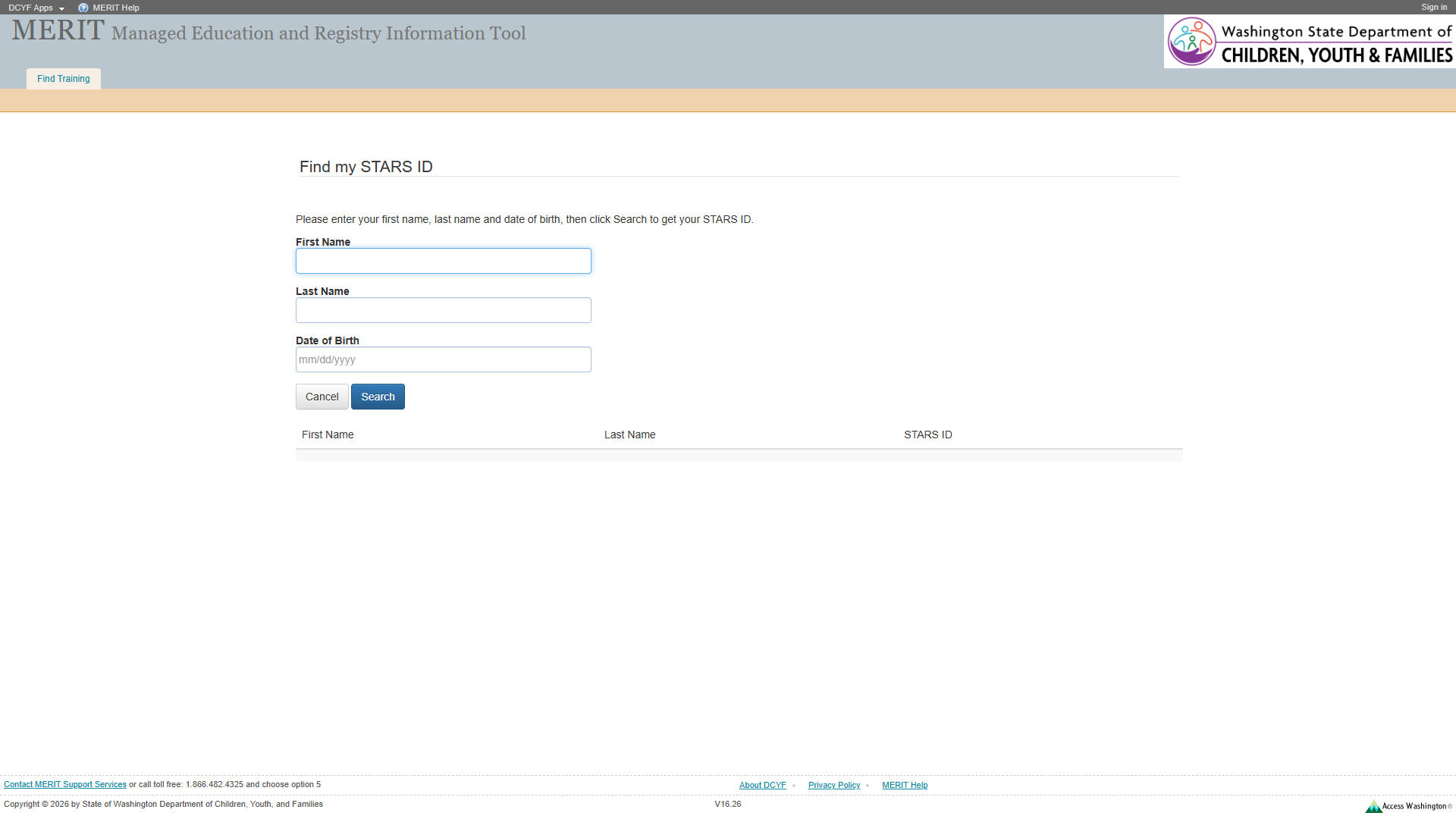
The <h1> (“MERIT Managed Education and Registry Information Tool”, ref=e15) is in the banner. Main content has no heading element – “Find my STARS ID” is rendered as text inside a group element (ref=e30) and a generic <div> (ref=e31), not as a heading.
Add <h1>Find my STARS ID</h1> or <h2> inside <main>.
4
“Find my STARS ID” Not a Heading
Text that acts as a heading visually must be designated as a true heading
1.3.1
Required
High
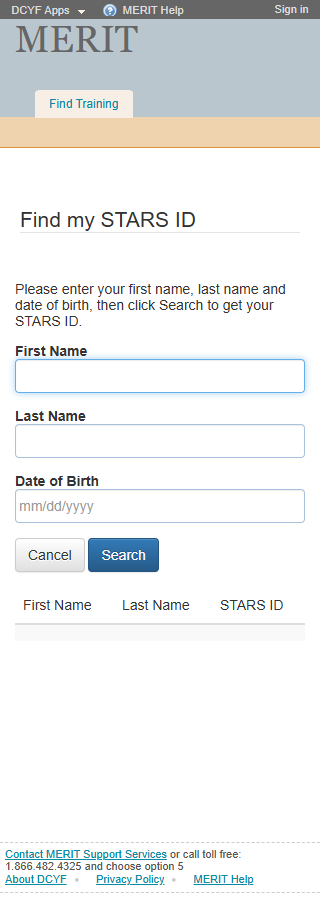
“Find my STARS ID” appears visually as a heading (larger text at top of content area, visible in both screenshots) but is marked up as text inside a generic <div> (ref=e31) within a group element (ref=e30). Screen reader users cannot navigate to it via heading navigation.
Change to <h2>Find my STARS ID</h2> (or <h1> if the banner heading is restructured).
Section 2: Links and Navigation
Standards reference: links-and-navigation.md
Evaluated
Pass
Fail
N/A
35
18
8
9
Findings
#
Topic
Requirement
WCAG
Level
Severity
Description
Proposed Fix
1
Skip Navigation
A “skip” link should be the first focusable element
2.4.1
Required
High
No skip link present.
Add skip link as first focusable element targeting main content.
2
MERIT Help Link Non-Functional
Purpose of each link must be understandable
2.4.4
Required
High
“MERIT Help” link in header (ref=e10, href="#") and footer (ref=e72, href="#") goes nowhere.
Provide a valid URL to a help resource, or remove the link.
3
DCYF Apps Link Non-Functional
Purpose of each link must be understandable
2.4.4
Required
High
“DCYF Apps” link (ref=e8, href="#") goes nowhere.
Provide a valid URL or remove the link.
4
Consistent Help
Help mechanisms on multiple pages must occur in same relative order
3.2.6
Required
Medium
“MERIT Help” (href="#") is non-functional, consistent with other pages but still broken.
Make “MERIT Help” link functional across all pages.
5
Multiple Ways
Multiple ways must be available to find other web pages
2.4.5
Required
Medium
Navigation limited to header and footer links. No site search, site map, or breadcrumbs.
Add at least two navigation methods.
6
Navigation List Markup
Navigation lists should use <nav>
–
Best practice
Medium
No <nav> elements on the page.
Wrap navigation lists in <nav>.
7
Links vs. Buttons
Links should navigate; should not be used for scripted functionality
–
Best practice
Medium
“DCYF Apps” and “MERIT Help” links with href="#" do not navigate.
Convert to buttons or provide real URLs.
8
Bypass Blocks
A method must exist to bypass repeated blocks of content
2.4.1
Required
Medium
No skip link exists. <main> landmark is present, providing partial bypass capability via screen reader landmark navigation. However, “Find my STARS ID” is not a heading, reducing heading-based bypass effectiveness.
Add skip link and promote “Find my STARS ID” to a heading element.
Section 3: Images and Visual Design
Standards reference: images-and-visual-design.md
Evaluated
Pass
Fail
N/A
43
30
3
10
Findings
#
Topic
Requirement
WCAG
Level
Severity
Description
Proposed Fix
1
Small Footer Text
Fonts should be easily readable
–
Best practice
Low
Footer text at approximately 11px, consistent with site-wide issue.
Increase footer text to at least 14px.
2
UI Component Contrast
Contrast of UI control boundaries must be at least 3:1
1.4.11
Required
Medium
Form input fields have light borders. The First Name field in the 320px screenshot shows a light gray border that may not meet 3:1 contrast against white background. Manual measurement needed.
Ensure input borders achieve at least 3:1 contrast ratio.
3
Results Table Visual Distinction
Blocks of content should be visually separated
–
Best practice
Low
The results table (First Name, Last Name, STARS ID columns) below the form has minimal visual separation from the form area. When empty, it appears as floating column headers with no clear boundary.
Add a visual separator or container around the results area. Consider hiding the table until results are available.
Contrast Measurements
Element
Foreground
Background
Ratio
Required
Result
“Find my STARS ID” heading text
Dark text
White
~12:1+
4.5:1
PASS
Body text (instructions)
Dark (#212529)
White
~15:1
4.5:1
PASS
“Search” button
White text
Blue bg
~4.5:1
4.5:1
PASS (borderline)
“Cancel” button
Dark text
White/light bg
~12:1+
4.5:1
PASS
Table headers “First Name” etc.
Dark text
White
~12:1+
4.5:1
PASS
Footer links
Blue (#0D6EFD)
White
~4.5:1
4.5:1
PASS (borderline)
Bold “First Name” label
Dark bold
White
~15:1
4.5:1
PASS
Section 4: User Input, Forms, and Dynamic Content
Standards reference: user-input-forms.md
Evaluated
Pass
Fail
N/A
117
39
10
68
Findings
#
Topic
Requirement
WCAG
Level
Severity
Description
Proposed Fix
1
Labels Not Programmatically Associated
Labels must be programmatically associated with inputs
1.3.1
Required
High
Form fields use text nodes adjacent to <input> elements without <label> elements. “First Name” is text before textbox (ref=e36); “Last Name” text before textbox (ref=e38); “Date of Birth” text before textbox (ref=e40). None appear to use <label for="...">. Screen readers may not announce field labels when tabbing to inputs.
Wrap each label in <label for="field-id"> or use aria-labelledby.
2
Group Label Uses Non-Standard Markup
Group labels must be programmatically associated
1.3.1
Required
Medium
The form is wrapped in a group element (ref=e30) with “Find my STARS ID” as its accessible name. This provides some grouping, but the text is in a <div>, not a <legend> within a <fieldset>. The grouping semantic may not be consistently conveyed across assistive technologies.
Use <fieldset> with <legend>Find my STARS ID</legend> for robust group labeling.
3
Required Fields Not Indicated
Required fields should be designated programmatically and visually
–
Best practice
Medium
The screenshot shows “First Name” in bold text (suggesting it may be required) while “Last Name” and “Date of Birth” appear in regular weight. However, the instructions say “Please enter your first name, last name and date of birth” implying all are required. No required attribute or aria-required is visible. No asterisks or “(required)” text.
Add required or aria-required="true" to required fields. Add visual required indicators with a legend.
4
Date Format Instruction
Restrictions should be communicated in label or instructions
–
Best practice
Medium
The Date of Birth field has placeholder “mm/dd/yyyy” (ref=e40). Placeholder disappears when typing and is not accessible to all assistive technologies.
Add persistent format hint as visible helper text or via aria-describedby.
5
Input Purpose Not Identified
Input purpose for personal data must be programmatically defined
1.3.5
Required
Medium
None of the input fields have autocomplete attributes. These fields collect personal data.
Add autocomplete="given-name" for First Name, autocomplete="family-name" for Last Name, autocomplete="bday" for Date of Birth.
6
Results Table Column Headers Missing Scope
Table headers must be properly associated with data cells
1.3.1
Required
Medium
The results table (ref=e47) has columnheader elements (First Name, Last Name, STARS ID) but may lack scope="col" attributes. With only one data row, most screen readers can infer the association, but explicit scope is recommended.
Add scope="col" to each <th> in the results table.
7
Results Table Caption
Data tables should have a programmatically associated caption
–
Best practice
Medium
The results table has no <caption> or aria-label. Its purpose (showing search results) is not communicated to screen reader users encountering the table.
Add <caption>STARS ID Search Results</caption> or aria-label="STARS ID search results" to the table.
8
Empty Results Table Always Visible
Dynamic content changes must be communicated
1.3.2
Required
Low
The results table is visible even when empty (shows column headers with one empty row). This may confuse users who think results should be present. When results load dynamically, the change should be announced.
Hide the results table until search results are available. When populated, announce results with aria-live="polite" or move focus to the results area.
9
No Visible Error Handling
Error messages must identify the item in error
3.3.1
Required
Medium
No error state visible in the snapshot. It is unclear how the form communicates validation errors.
Implement accessible error messages using aria-describedby, aria-invalid, or role="alert".
10
Session Timeout Unknown
Users must be allowed sufficient time
2.2.1
Required
Low
Unknown whether this page has a session timeout.
Verify no timeout exists, or implement a timeout warning.
Section 5: Multimedia, Animations, and Motion
Standards reference: multimedia-and-motion.md
Evaluated
Pass
Fail
N/A
48
2
0
46
No issues identified in this section.
No audio, video, multimedia, or animated content detected. No flashing content (WCAG 2.3.1 pass). No time-limited content visible (WCAG 2.2.1 pass – manual verification recommended for session timeout).
Summary
Compliance Overview
Section
Evaluated
Pass
Fail
N/A
1. Structure & Semantics
33
22
4
7
2. Links & Navigation
35
18
8
9
3. Images & Visual Design
43
30
3
10
4. User Input, Forms & Dynamic Content
117
39
10
68
5. Multimedia, Animations & Motion
48
2
0
46
Total
276
111
25
140
Findings by Severity
Critical
None
High
Missing skip link (WCAG 2.4.1)
“MERIT Help” and “DCYF Apps” links with href="#" have no discernible purpose (WCAG 2.4.4)
“Find my STARS ID” visual heading not marked as a heading element (WCAG 1.3.1)
Form labels not programmatically associated with inputs (WCAG 1.3.1)
Medium
Missing <nav> landmarks (Best practice)
<h1> in banner, not main content (Best practice)
Non-functional help mechanism (WCAG 3.2.6)
Multiple navigation methods limited (WCAG 2.4.5)
Bypass blocks partially addressed – <main> exists but no skip link or content heading (WCAG 2.4.1)
Non-standard group label markup (WCAG 1.3.1)
Required fields not indicated (Best practice)
Date format communicated only via placeholder (Best practice)
Input purpose not identified with autocomplete (WCAG 1.3.5)
Results table missing scope on headers (WCAG 1.3.1)
This page uses the modern MVC layout template with <main> landmark (ref=e26), banner (ref=e3), and contentinfo (ref=e58).
The group element (ref=e30) with accessible name “Find my STARS ID” provides some semantic grouping, but it is not a standard <fieldset>/<legend> pattern.
The results table structure is clean with proper columnheader elements, but needs scope attributes and a caption.
The page exposes search results that may include personal information (first name, last name, STARS ID). Consider whether this raises privacy concerns – any user can look up anyone’s STARS ID by name and date of birth.
Focus indicators could not be visually confirmed from the automated screenshot; manual verification recommended.
The page reflows well at 320px based on the screenshot – form fields stack vertically and remain usable.
Severity Definitions
Severity
Criteria
Critical
Required standard violated; completely blocks access for one or more disability groups (e.g., keyboard trap, no form labels, missing alt text on functional images)
High
Required standard violated; significant barrier that makes the feature very difficult to use (e.g., poor contrast on primary content, missing heading structure, focus indicator absent)
Medium
Required standard violated with moderate impact, OR Best practice violated with significant user impact (e.g., heading levels skipped, link purpose unclear from context, insufficient target size)
Low
Best practice not followed; minor impact on usability (e.g., title could be more concise, landmark count could be reduced, hover indicator could be enhanced)